
QuickBooks sits at the heart of many finance teams, managing records, payroll, and day to day business transactions. When its data becomes corrupted or inaccessible, normal operations can slow down or stop altogether.
Even a minor error in a QuickBooks company file can result in missing invoices, incorrect balances, or gaps in your transaction history. Problems like these disrupt workflows, compromise reporting accuracy, and may create compliance risks.
Understanding what causes QuickBooks data failure is the first step towards protecting critical financial information and maintaining business continuity, whether through robust prevention measures or timely QuickBooks file repair.
Understanding QuickBooks Data Files
A QuickBooks company file (QBW) stores your core financial information, from invoices and payments to employee records and tax details. Every entry you record in QuickBooks is written into this structured database so that your business data stays organised and accessible.
To support the main company file, QuickBooks also creates additional components such as TLG (Transaction Log) and ND (Network Data) files. These help track user activity, manage networked access, and keep data consistent when multiple users are working at the same time.
Because day to day financial operations depend on these files, any corruption, incomplete updates, or mismanagement can quickly lead to serious data loss, errors in reports, or system instability where QuickBooks file repair becomes essential.
Common Reasons for QuickBooks Data Failure
QuickBooks data failures can arise from both hardware and software issues. Understanding these root causes helps you react quickly and decide when professional QuickBooks file repair is needed.
Hardware malfunctions:
Disk errors, bad sectors, or failing drives can corrupt QuickBooks company files stored on a workstation or server.Improper system shutdowns:
Power cuts, crashes, or forced shutdowns can interrupt active QuickBooks processes and leave files in a damaged state.Network instability:
In multi user mode, dropped connections or unstable networks can cause incomplete transactions and write errors in the database.Outdated or conflicting software:
Running an outdated QuickBooks version, incompatible add ons, or conflicting applications increases the risk of data corruption.Improper backup practices:
Backups that are incomplete, untested, or stored on failing media often fail when you try to restore them.
You can learn more about how database damage develops over time in our post on database corruption.
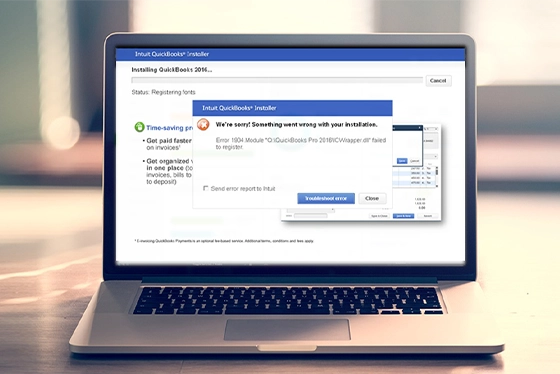
Signs Your QuickBooks File Is Corrupted
Identifying the early signs of QuickBooks file corruption can help you avoid more serious data loss. Common warning indicators include:
Frequent error messages:
QuickBooks starts displaying unexpected error codes or crashes during routine tasks such as posting transactions or running reports.Slow performance:
Opening, saving, or switching between company files takes noticeably longer than usual, particularly in multi user mode.Missing or duplicated entries:
Transactions, invoices, or account balances appear incorrect, disappear unexpectedly, or show duplicated records.File access problems:
The company file refuses to open, prompts repeated repair messages, or leaves QuickBooks stuck in a “Not Responding” state.Backup failures:
Scheduled or manual backups fail regularly, generate warnings, or produce incomplete backup files.
Spotting these symptoms early gives you the opportunity to act quickly, protect your data, and seek professional QuickBooks file repair support before the damage escalates.
How to Reduce the Risk of Data Failure
Reducing the risk of QuickBooks data failure starts with consistent maintenance and careful handling of your files. Keep both QuickBooks and your operating system up to date to maintain compatibility and stability, as outdated software is a common source of file conflicts.
Create verified backups to external drives or secure network locations, and test them periodically. Avoid working directly over unstable network connections, because sudden interruptions can easily damage active company files.
It is also important to monitor disk health on a regular basis and replace failing drives before they cause corruption or data loss.
For a more detailed overview of long term prevention measures, take a look at our guide on data loss prevention. If problems persist despite good practices, professional QuickBooks file repair support can help protect your financial records.

When Professional Recovery Becomes Necessary
If your QuickBooks file becomes inaccessible or continues to show errors after basic troubleshooting, professional recovery is the safest next step.
Attempting to rebuild, compress, or restore a damaged company file without specialist knowledge can easily lead to permanent data loss.
At this point, stop using the affected system to avoid overwriting critical records. Data recovery specialists can work from forensic copies of your drive, extract the damaged database, and perform structured QuickBooks file repair using methods that preserve data integrity.
Professional support is particularly important for organisations that depend on accurate financial reporting and audited records. You can learn how experts manage business critical incidents in our post on business data recovery.
Fast turnaround times for business-critical data
QuickBooks Data Recovery Services by RAID Recovery Services
At RAID Recovery Services, we specialise in repairing and restoring corrupted or damaged QuickBooks company files, including QBW, ND, and TLG formats. Our engineers carry out secure diagnostics to identify the root cause of failure and recover critical financial data without compromising accuracy or integrity.
We use advanced recovery tools in controlled environments to address complex database corruption, missing records, and synchronisation issues. Whether the problem is due to logical damage or underlying hardware failure, our team applies structured QuickBooks file repair techniques to maximise recovery success.

Conclusion: Protecting Your Financial Data
QuickBooks streamlines financial management, but its data is still vulnerable to corruption and hardware failure. Understanding the common causes of QuickBooks data issues and recognising early warning signs helps you take preventative action before serious loss occurs.
When problems do arise, professional QuickBooks file repair and recovery is the most reliable way to restore critical records safely.
At RAID Recovery Services, we support businesses in regaining access to their QuickBooks data quickly and securely.
Our specialists combine technical expertise with proven recovery methods to help ensure your financial information remains accurate, accessible, and protected.
Trust the experts with proven results
Frequently Asked Questions
What causes QuickBooks data failure?
QuickBooks data failure can be caused by hardware faults, abrupt system shutdowns, unstable network connections, or corrupted software components. These problems can damage the company file and leave your accounting data unreadable or inaccessible.
How can I tell if my QuickBooks file is corrupted?
Typical warning signs include frequent error messages, missing or duplicated transactions, failed backups, or being unable to open the company file at all. Slow performance, incorrect balances, and inconsistent reports are also clear indicators of QuickBooks file corruption.
Can I fix a corrupted QuickBooks file myself?
Built in rebuild or verification tools may resolve minor issues, but serious corruption usually requires professional QuickBooks file repair. Attempting advanced repairs without specialist knowledge can make the damage worse and increase the risk of permanent data loss.
How can I prevent QuickBooks data corruption in the future?
Maintain regular, verified backups, keep QuickBooks and your operating system updated, and avoid force closing the software. Using reliable storage hardware, stable networks, and clean shutdown procedures also helps reduce the risk of future corruption.
Who should I contact for professional QuickBooks data recovery?
Contact RAID Recovery Services for specialist QuickBooks data recovery. Our engineers can safely restore corrupted QBW, ND, and TLG files using structured recovery methods designed to protect the accuracy of your financial records.